

10 Things Every Tradie Website Should Have
A reference guide for tradies: the ten things a website needs to win the job, not just look good. With pictures, a before and after, and a check for your own site.
Plenty of tradie websites look good and never ring. The ones that do ring have the same ten things. Here they are, in plain words, so you can check your own.
What your website is actually for
Every one of the ten serves one of these steps.
Most websites are built like a brochure: lots of pages to wander through. A website that wins jobs is built like a funnel: every page leads to the call or the quote.
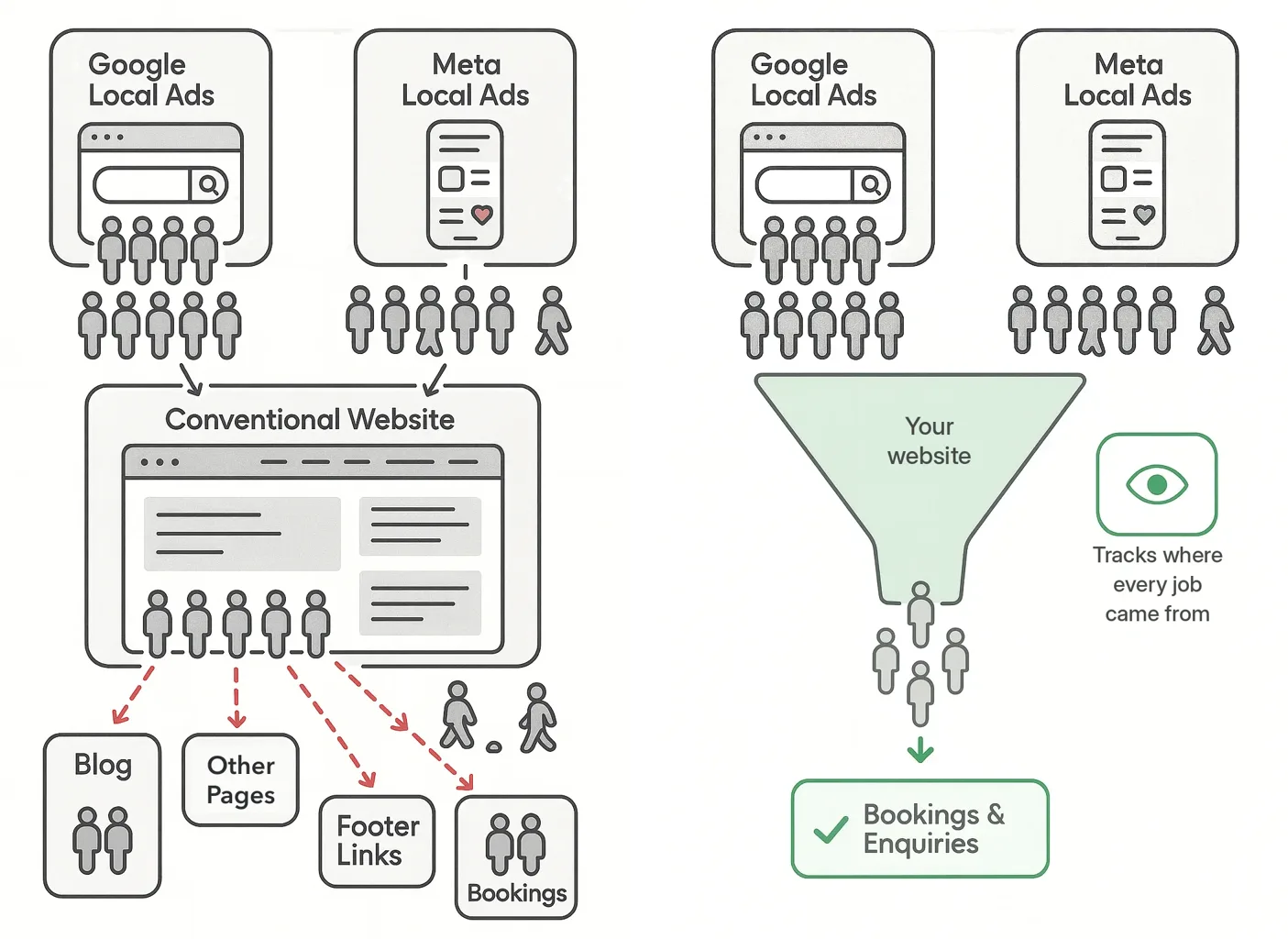
Left: a normal website. Many doors, and people wander off. Right: a funnel. Every page leads to the call or the quote, and every job is tracked.
1 to 5
The top of the page: what they see in five seconds
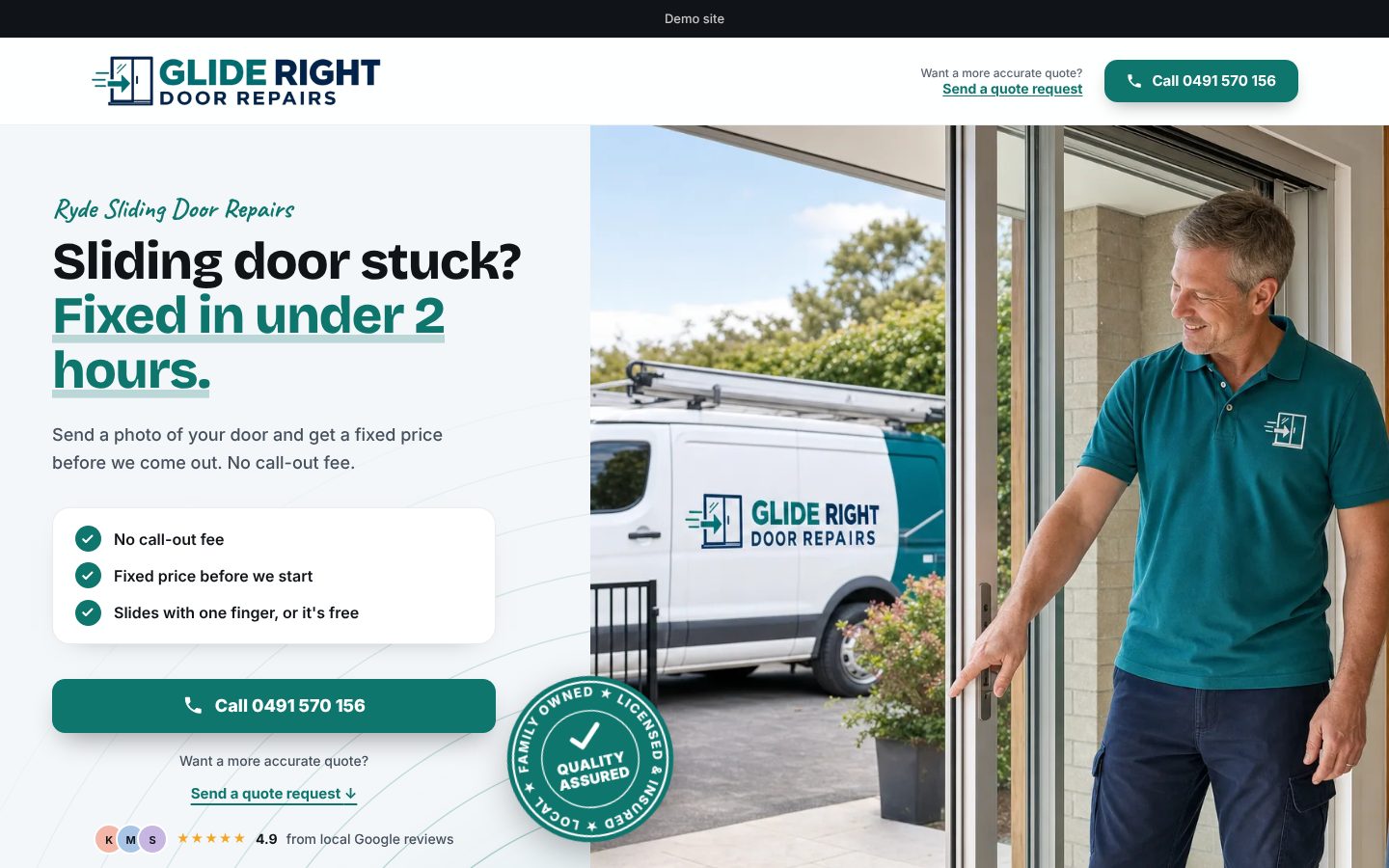
Someone with a leaking roof doesn't read. They glance. In the first screen they need to see that you're local, that you fix their problem, and how to reach you.
 12345
A sample trade. Five things, all above the fold.
1Your suburb, in the first second. They know you're local.
2Their problem, in their words, then your answer.
3The reasons to pick you, before they ask: no call-out fee, a fixed price, a guarantee.
4One big Call button. Most people want to ring.
5Proof from locals: real reviews, near the top.
Writing the top of your page
Do
- “Sliding door stuck? Fixed in under 2 hours.”
- “Ryde and the North Shore”
- “No call-out fee. Fixed price before we start.”
Don't
- “Welcome to Smith Door Repairs”
- “Servicing all areas”
- “Quality service at competitive prices”
Most of your customers are on a phone, often standing in front of the problem. The Call button should follow them down the page, so it's always one tap away.
6
A photo quote request, not a contact form
A contact form asks for a message. A photo quote request asks for the job, so you can see it before you ring back.
Step through it
A photo quote request, one step at a time
Step 1 of 5
What's the job?
What you know before you ring back
Before
A contact form
- “Hi, need a quote, call me”
- No idea how big the job is
- A trip out just to have a look
After
A photo quote request
- The job, in their words, with photos
- Your price is right the first time
- The right parts in the van: one trip
7
A front door for every job you want more of
People don't search for “plumber”. They search for the problem: “blocked drain Ryde”, “no hot water”. Each search should land on a page about that job, not on your home page.
One website, many front doors
| A normal website | Many front doors | |
|---|---|---|
| Someone searches “blocked drain near me” | Home page: “Welcome to Smith Plumbing” | “Blocked drain? Cleared today.” |
| Someone searches “no hot water” | Home page, then hunt through Services | “No hot water? Fixed or replaced today.” |
| Your ad for gutter cleaning | The same home page | The page about gutter cleaning |
| What they think | “Do they even do this?” | “That's exactly my problem.” |
Each front door speaks to one market, in its own words, and still leads to the same Call button.
Tip
Pick your markets first
Choose the two or three jobs you want more of, at the price you want. Those get their own front door. The rest can wait.
8
Every page leads to the call or the quote
The same path, on every page
No dead ends. No “read more” rabbit holes. If a page doesn't lead to the call, it's a way out.
9
Know where every job came from
Was it Google, your ad, Facebook, or a mate? If you can't tell, you can't tell where to put your next dollar.
Where one trade's 88 enquiries came from, in one month
Source: A home-services trade, four cities, October 2026: its own dashboard, every enquiry tagged with where it came from.
That's the point of knowing: double down on what's working, and stop paying for what isn't.
10
The enquiry on your phone, so you call back first
The job often goes to whoever rings back first. The enquiry and its photos should land on your phone, with one tap to call, while you're still on the tools.
Try the numbers
What a slow call-back can cost you
Put in your own numbers.
Lost a month
$1,800
Lost over 12 months
$21,600
Check your website against the ten
- Your suburb in the first screen
- Their problem, in their words, as the headline
- The reasons to pick you, before they ask
- One big Call button that follows them down the page
- Real local reviews near the top
- A photo quote request, not a contact form
- A page for each job you want more of
- Every page leads to the call or the quote
- You know where every job came from
- Enquiries and photos land on your phone
Want all ten, set up for you?
Every one is built into our Enquiry Engine, set up for your trade by our team within 24 hours. $595 for 12 months, GST included.
See the Enquiry EngineAbout the author. Bach Ly is a software engineer with 17+ years building websites and applications for teams at Cochlear, CommSec, Pepper Money and ResMed, and now builds web applications and online integrations through KoalaDigital. More about Bach.