

Bach Ly
Senior engineer, KoalaDigital
Hi team,
More than twenty years in business and 4.9 stars from 223 Google reviews: no other passport expediter in Austin has more. Your website already reaches the first page of Google for most Austin passport searches, and Google puts you on the map beside your main rival.
What holds you back is how the website works on a phone, and that your best proof, those reviews, isn't on it. Here's what I found, and what good practice looks like.
Bach
Scorecard
out of 100
- Reputation96
4.9 stars from 223 Google reviews, the most in town
- Found on Google55
Strong on Austin searches, second on the map
- On a phone30
An old fixed layout; prices don't show
- Page speed55
First words fast; the main picture at 4.1 s
- Words and message65
A clear promise; your best proof is missing
- Tracking70
Google Analytics and the Facebook Pixel are on
How we reviewed it
5
pages, page by page
2
devices: phone and computer
117
Google searches you show up for
3
competitors compared
223
Google reviews, 4.9 average
4G
speed, timed on a phone
Data from Google, DataForSEO and our own tests, 22 October 2026. Measured against Google's own marks for speed and mobile use. Searches checked as a phone in Austin.
Reviewed by Bach Ly, 17 years building software and websites for Australian teams including





01What's working
You already have what most businesses spend years chasing: customers who trust you, and a promise people understand. Keep all of this.

02Your Google profile and reviews
When someone nearby searches for a passport service, Google shows its map and three businesses before any website. For a business like yours, that's where many calls start.
What Google shows today
- Rating
- 4.9 ★ from 223 reviews
- Filed as
- Local Government Office
- Photos
- 6
- Hours
- Mon–Thu 9–4, Fri 9–3:30
- Phone
- Listed
Your Google listing as Google's Places data gives it, 22 October 2026.
Against the other passport services in Austin
Google ratings, 22 October 2026. The other private expediters we found nearby have two reviews or fewer.
03How you show up on Google
When people search Google, the first page is where nearly all the clicks go. Here's where your 117 searches sit today, across the US.
Top 35
Rest of page 131
Page 214
Further back67
Where you rank now
Google's US-wide rankings and monthly searches, from DataForSEO, 22 October 2026.
What people in Austin search for
Searches a month from Austin, from Google's own advertising data. The first two are where the people are.
People rarely type “expedited”. They search “passport” and the city, then choose whoever looks fastest and most trustworthy.

04You and your competitors
Locally, it's a two-horse race: you and Capitol Rush Passports & Visas, both close to 5 stars. Your website beats theirs on Austin searches. On the map, they come first.
26
Austin searches where your website is on page 1
3
where Capitol Rush's website is
5 of 5
maps we checked where they came first
The map, on a phone in Austin
The three businesses Google shows on its map, from DataForSEO, as a phone in Austin, 22 October 2026.
Who else is on page 1
Rankings from DataForSEO: Labs, United States, and live results as a phone in Austin, 22 October 2026.

05Your words: is the message clear?
In the first five seconds a visitor wants to know what you do, where, and why you. Your home page answers the first two well. The third, why you, is the part that's missing.

06Your website on a phone
Most people who search for a passport in a hurry are on a phone. Here's your home page as an iPhone shows it.
 123456
- 1Your name runs into the logo behind it, so the very first thing a visitor sees looks broken.
- 2An empty blue band. With the header, it fills half the first screen before your promise.
- 3Your promise and situation buttons: exactly right.
- 4Six boxes of services, and no stars or reviews anywhere on the page.
- 5Your experience and history, in a long block of small text.
- 6The contact form, at the very bottom.
Behind the scenes this is Wix's older phone layout: a fixed page 320 pixels wide that the phone stretches to fit. That's why everything looks slightly oversized and off on a modern phone. Best practice is a layout that fits itself to any screen.
07Your website on a computer
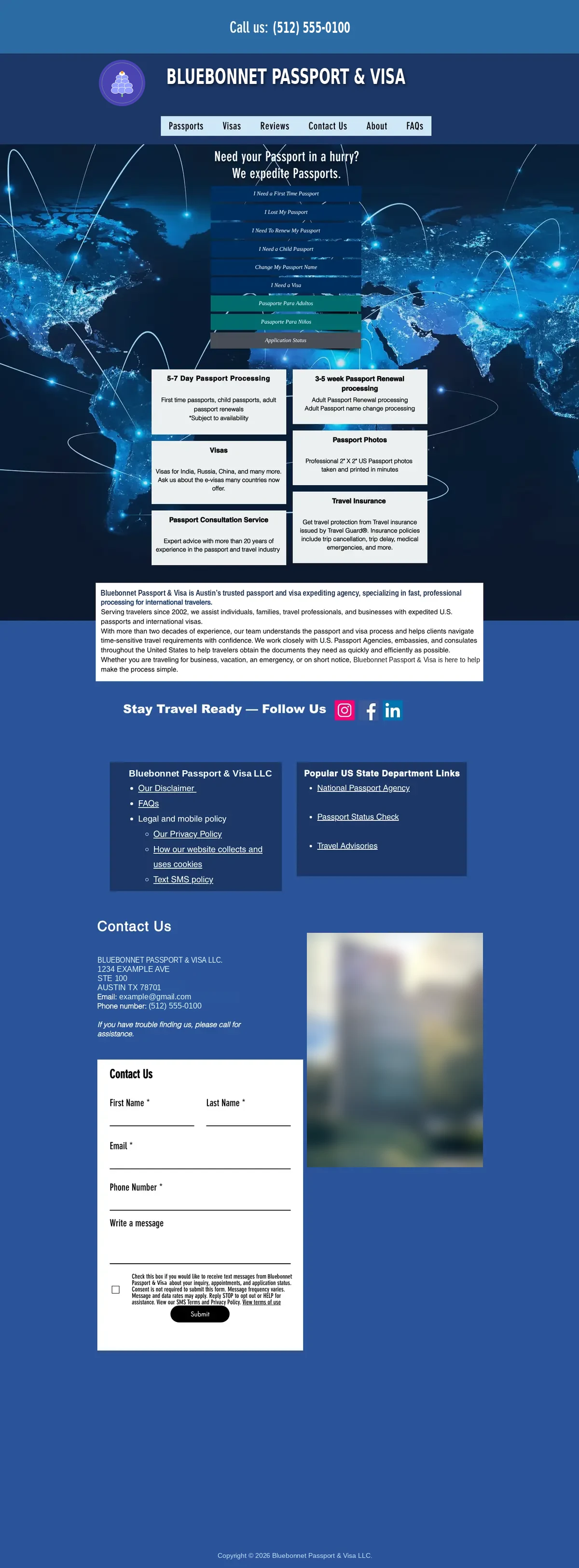 12345
- 1Your phone number, first thing on the page.
- 2The situation buttons are small italic type on a busy world map: the most useful thing on the page is the hardest to read.
- 3Grey boxes in a different typeface from the rest. Three typefaces in all, so it reads as several websites stitched together.
- 4Your history and experience, in small text in a white box.
- 5A big empty blue space at the bottom of every page.

08Page speed
Your home page on a typical 4G phone, against the marks Google uses.
First words on screen
0.8 s
Main content showing
4.1 s
5.9 s
until it's fully loaded
158 files
2.1 MB to download
The words appear quickly. The main content, the big world-map picture, takes 4.1 seconds, just past Google's “poor” mark. Much of the 2.1 MB is Wix fetching your other pages and two PDFs in advance, which a phone on a slow connection pays for too.
Timed on 22 October 2026 in Chromium, as a phone on 1.6 Mbps with 150 ms delay, cache empty; the middle of three runs.

09Tracking: can you see what's working?
To know which searches, ads and pages bring you customers, a website needs to count visits and, more importantly, calls and enquiries.

10Best-practice checklist
The basics every business website should have, checked on yours.
11What to keep, what to improve
Your words and reputation are strong; the frame around them is what's dated. In the order I'd take them:
Keep
Improve first
Improve next
If you have a question about anything in this review, please don't hesitate to get in touch.
Talk to us
KoalaDigital